![Tolerisk Logo 2023-3.png]](https://21417375.hs-sites.com/hs-fs/hubfs/Tolerisk%20Logo%202023-3.png?height=40&name=Tolerisk%20Logo%202023-3.png)
The Securities page is an integral component of our Portfolio Analytics features, providing a platform to document your securities effectively.
For accounts involving bonds, create proxies on the "Securities" page by following these steps -
- Click on the “Portfolio Analytics” dropdown on the left side of the site.
- Select the “Securities” tab.
- Click “Add Security” on the Securities page.
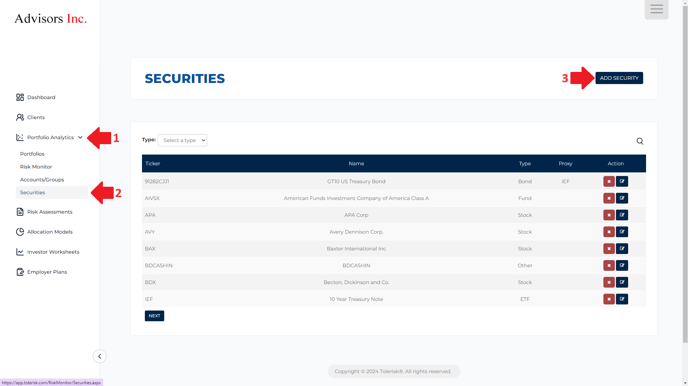
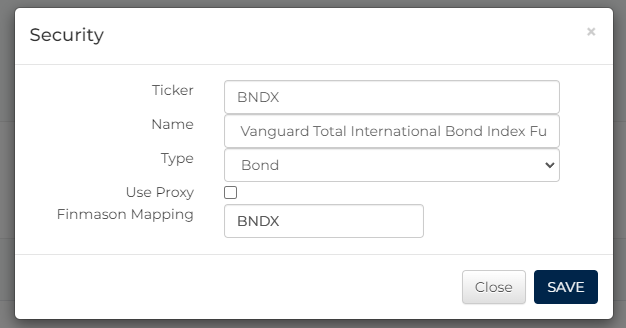
- In the pop-up, first, add your proxy fund and refresh the page.
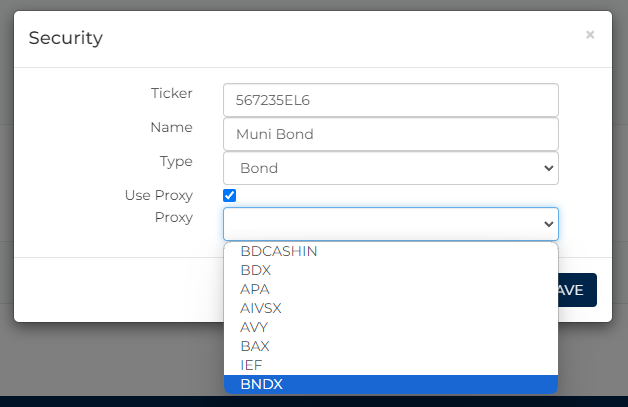
- Click “Add Security” again and add your bond (or another security that requires a proxy), ensuring to check the “Select proxy” box this time.
Some things to note about this page -
- The proxies added to this page will be used to assess risk levels for accounts listed on the "Accounts/Groups" page. If you want to include a bond fund in a model portfolio or an account created on the "Portfolios" page, you must enter the proxy fund as a separate row directly on the "Portfolios" page.
The video below will highlight the steps outlined in this article -